If you’re a GrabFood or GrabMart Merchant in Malaysia, you’ve probably heard that Grab is upgrading its merchant devices starting from December 2025.
Older models like Sunmi V2, V2s, and V2 Pro and V1s will no longer support the latest GrabMerchant app.
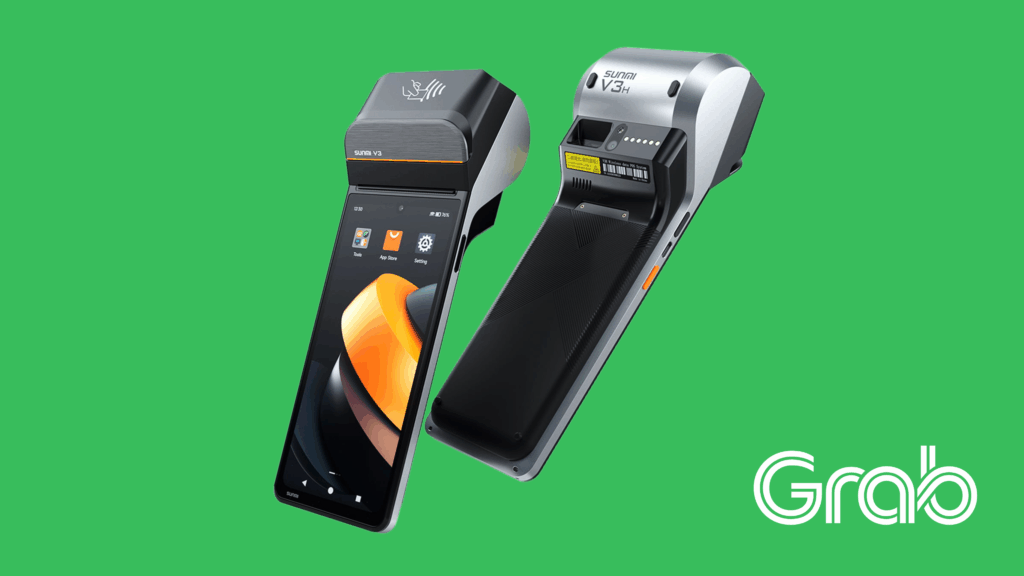
The new recommended device for all Grab merchants is the Sunmi V3 — the latest Android-based terminal designed for smooth order management, faster performance, and better reliability.
In this guide, you’ll learn everything you need to know about Sunmi V3 as a Grab Merchant Device — including setup, usage tips, troubleshooting, and where to buy it safely in Malaysia.
Why Sunmi V3 Is Now The Official Grab Merchant Device
The Sunmi V3 is the new generation GrabFood and GrabMart device, fully compatible with the latest GrabMerchant App (Android 11 and above).
With a 6.75” HD+ display, Octa-core CPU, and 3GB RAM + 32GB ROM, it delivers up to 3× faster app launch speed compared to older Sunmi V2 device.
Your GrabMerchant App can be easily downloadable from the Sunmi App Store.
Here’s what you can do inside the app:
View and accept new orders instantly
Pause or resume order taking during busy hours
Update item availability (e.g., sold out)
Access daily sales reports and statements
Check merchant settlement details (MSR)
Print receipts directly from the device printer.
All of this runs smoothly on Sunmi V3, thanks to its upgraded processor and memory.

Meet Mipos - Malaysia's Only Official Sunmi Showroom
When you’re buying a Sunmi device, choosing the right supplier matters.
Mipos is proud to be the first and only official Sunmi showroom in Malaysia, known as Sunmi Home. We are the only place in Malaysia where you can see, touch, and test Sunmi devices in person — including Sunmi V3, V3 Mix, D3 Mini, D3 Pro, CPAD, M3, L3 and other latest models.
- Genuine Sunmi warranty
- Extended 13-month warranty (1 month more than other retailers)
- Official training from Sunmi Headquarters, in Shanghai
- Demo & hands-on support at our showroom
If you’re looking for a trusted supplier with ready stock, Mipos is your best choice.
Visit us at Sunmi Home Malaysia, or contact us via WhatsApp.

How the GrabMerchant App Works on Sunmi V3
Let’s go through what happens when a customer orders from your GrabFood or GrabMart store:
Customer places an order on Grab.
The order appears instantly on your Sunmi V3 device.
The built-in printer automatically prints two slips — one for your store and one for the delivery partner.
Your kitchen or team prepares the order while the device tracks order progress.
A Grab driver-partner arrives to pick up the food.
The customer receives their order — all automatically synced within Grab’s system.
The process is fast, reliable, and error-free — no manual typing, no missed orders.
How to Update Your GrabMerchant App on Sunmi V3
Keeping your GrabMerchant App updated ensures smooth performance and prevents login issues. Here’s how you can update it easily:
Using Sunmi App Store
Connect your device to a stable Wi-Fi network.
Open the Sunmi App Store from your home screen.
On the search bar, type in “GrabFood Merchant” or “GrabMart Merchant” accordingly.
Click on the app.
Tap on “update” to install the latest versions of your apps.

Key Features of Sunmi V3 (for Grab Merchants)
Here’s why Sunmi V3 is now the top choice for Grab merchants:
1. Fast Performance
- Octa-core processor with up to 2.4GHz clock speed.
- 3GB RAM + 32GB storage ensures smooth multitasking.
- Apps load 3× faster than on older models.
2. Bigger & Brighter Display
- 6.75-inch HD+ IPS screen, perfect for reading orders clearly.
- 420 nits brightness — readable even under strong lighting.
3. Built-in Printer
- High-speed 58mm thermal printer, up to 80mm/s.
- Supports receipt and label printing.
- Improved dust protection extends printer life.
4. Long Battery Life
- Removable 3100mAh battery with Sunmi’s smart battery algorithm.
- Optimized modes for long runtime and extended lifespan.
5. Hyper Wi-Fi Stability
- Dual-band Wi-Fi (2.4GHz / 5GHz) with Hyper Wi-Fi technology ensures stable connection, even in crowded areas.
6. Advanced OS
- Runs on Sunmi OS 4.0, based on Android 13.
- Secure, smooth, and built for business performance.
7. Fingerprint Unlock
- Log in easily using fingerprint authentication — faster and safer.

Maintenance & Care for Long-Term Use
To ensure your Sunmi V3 lasts for years:
1. Keep Away from Heat & Moisture
- Avoid placing it near stoves, steamers, or sinks. High heat can damage the printer and battery.
- Also, clean the printer area regularly to prevent dust buildup.
2. Charge Correctly
- Recharge when battery drops to around 20 %.
- Avoid deep discharges to prolong battery life.
- Also, use original Sunmi charger for best performance.
3. Restart Daily
- Power off at the end of your shift to refresh the system and save battery.
4. Update Regularly
- Always keep the GrabMerchant app and updated to the latest version to ensure smooth login and device stability.
5. Use Only for Grab Merchant Activities
- Avoid installing unrelated apps to prevent lag or malfunctions.
Tips to Maximize Your Sunmi V3 Performance
Grab recommends these best practices to keep your device running perfectly:
1. Keep Volume On For Notifications
Always ensure your device isn’t in Silent Mode.
Go to Settings → Sound & Notification, and select “General” or “Outdoor.”
2. Use Strong Wi-Fi Connection
A stable Wi-Fi connection prevents delays or missed orders.
Avoid weak mobile data or unstable signals.
3. Update Your App Regularly
Keep your GrabMerchant app updated from Google Play Store to ensure full compatibility.
4. Charge before 20% Battery
Charge your device before it drops too low to maintain battery health.
5. Turn Off After Closing
Power down your device after each shift to extend battery life.
6. Use Only for Grab Merchant App
Avoid installing unnecessary apps that might slow down your system or cause login issues.

Common Troubleshooting Tips
If you encounter a problem with your device, try these steps before contacting Grab support.
1. App or Device Not Responding
Hold the power button for 15 seconds to restart.
Check that the battery is charged.
Reconnect Wi-Fi.
Update the GrabMerchant app if available.
If it still doesn’t work, contact the Grab Help Centre.
2. Printer Not Working
Might be because paper jam or out of paper roll. Check paper roll and make sure the paper roll is put in the correct orientation.
Check for power connection too. Try switching on while charging and avoid overcharging to prevent overheating.
To test the printer, go to Settings > Device > Test Print. Tap on Print. If issue persist, press and hold the Power + Volume Up buttons together for about 10 seconds to enter Phoenix Recovery Mode. Then, choose restart or factory data reset if the problem persists (note: this will erase all saved data).
To adjust receipt settings, open GrabMerchant app, go to More > Store Settings > Auto Print Receipt. Then, select your preferred receipt type.
3. Device Stuck on Logo or Black Screen
Possibly because the app crash or the device is low power
Check Wi-Fi connection and restart.
If black screen persists, charge for 1–2 hours before turning on again.
Re-install the GrabMerchant app if necessary.
Shut down the device. Then, press and hold the Power + Volume Up buttons together for about 10 seconds to enter Phoenix Recovery Mode. Then, choose restart or factory data reset if the problem persists (note: this will erase all saved data).
4. “Attacked!” Message on Startup
The device might have been compromised.
Immediately contact Grab Help Centre for further assistance.
5. Device Won’t Turn On
- Possibly the device is low battery.
- Charge for at least 1-2 hours, then try again.
- Try switching the device on while still plugged into the charger.
- Try to charge with a different cable, charger, or power outlet.
- Press on the power button for around 10 secs to restart the device.
- For Sunmi V3, make sure the charging accessories meet the compatibility standards, where power adapter has input AC 100~240V and output DC 5V/2A, using USB to Type C cable.
6. When Your Device Is Stuck or Running Slowly
- Force close the app. First, go to Settings › Apps. Select GrabMerchant, then tap Force Stop.
- Then, clear data and clear cache.
- Next, make sure you’re connected to a stable Wi-Fi network before reopening the app
- If the device still feels slow, update the GrabMerchant App to the latest version. Remember to reconnect your Wi-Fi and restart the device after the update.
These steps usually resolve most lagging or freezing issues and help your GrabMerchant App perform more smoothly.
7. Device Asking For Password
- The password or unlock pattern was likely created by the person who set up the Gmail account linked to your Grab Merchant account.
- This could be your manager, IT staff, or another team member in charge of account setup.
- Try reaching out to them to get the correct password or to help unlock the device.
What’s Inside the Box?
When you purchase your Sunmi V3 from Mipos, you’ll receive:
Sunmi V3 Terminal (Malaysia version)
USB-C charger and cable
Built-in thermal printer (ready to use)
Free 1 roll of thermal paper
Quick Start User Manual
Official 13-month warranty (exclusive from Mipos)
Optional accessories available:
Silicone cover
Multi-function cradle
Hand strap or sling for portability

Frequently Asked Questions (FAQ)
1. Can I use mobile data instead of Wi-Fi?
Yes, Wi-Fi is recommended for stability. Sunmi V3 supports dual Nano SIM cards for 4G mobile data.
2. How long is the warranty?
Devices purchased from Grab or other retailers usually come with a 6 to 12 months warranty. However, Mipos provides 13 months warranty — the longest in Malaysia.
3. Can I update my menu prices on the device?
You can adjust availability directly, but price or menu updates require contacting Grab Help Center.
4. Can I use the Sunmi V3 for non-Grab apps?
Technically possible, but not recommended — it’s optimized for Grab Merchant use and POS operations.
5. Can I use Sunmi V3 to scan QR codes?
Yes, you can use the Sunmi V3 to scan QR codes. It comes with a 5-megapixel autofocus camera and a built-in LED flash, allowing it to scan quickly and accurately — even in dim lighting or challenging environments.

Why Choose Sunmi V3 from Sunmi Home Malaysia
At Mipos, we’re not just another retailer — we are the first and only official Sunmi showroom in Malaysia, known as Sunmi Home.
Here’s why thousands of Grab merchants nationwide trust us:
1. Official Sunmi Partner Training
Mipos team is officially trained by Sunmi headquarters in Shanghai. We understand the technical details of each model and can help you choose the right device for your store.
2. Full Range of Sunmi Products
From Sunmi V3 to Sunmi D3 Pro and D3 Mini — we carry the most complete range of Sunmi devices in Malaysia, ready for you to see and try in person at our showroom.
3. Extended 13-Month Warranty
Only Mipos provides an extra month of protection — 13 months total coverage for your Sunmi V3.
4. Special Promotion for Grab Merchants
In conjunction with Grab’s device upgrade announcement, there is a RM 50 discount voucher (voucher code: GRABMEX50) exclusively for Grab merchants purchasing Sunmi V3.
5. Walk-In Experience
Visit our Sunmi Home showroom in Cheras to see and feel the device before you buy. No other store in Malaysia offers this hands-on experience.

The Future of Grab Merchant Devices
Grab is moving toward more modern and secure hardware to ensure smooth operations for all merchants.
Older models like Sunmi V2 and V2s are gradually becoming incompatible with newer GrabMerchant app updates because they run on older Android versions.
The Sunmi V3 is fully compatible with Android 13-based Sunmi OS 4.0, ensuring long-term stability, faster loading times, and support for future Grab updates without issues