If you’re a GrabFood or GrabMart merchant still using an older device like Sunmi V2, V2s, V2 Pro, or V1s, it’s time to get ready for an important upgrade.
Important Update: Grab Merchant Devices Changing to Sunmi V3 Starting 1 December 2025
Starting 1 December 2025, Grab will officially stop supporting older Android devices that cannot meet the new app requirements.
According to Grab’s latest notice, devices running below Android 11 and with less than 3GB of RAM will no longer be compatible with the GrabMerchant App.
That means older models such as Sunmi V2, V2s, V2 Pro, and V1s will not be able to log in or use the GrabMerchant App after this date.
The Recommended Upgrade: Sunmi V3
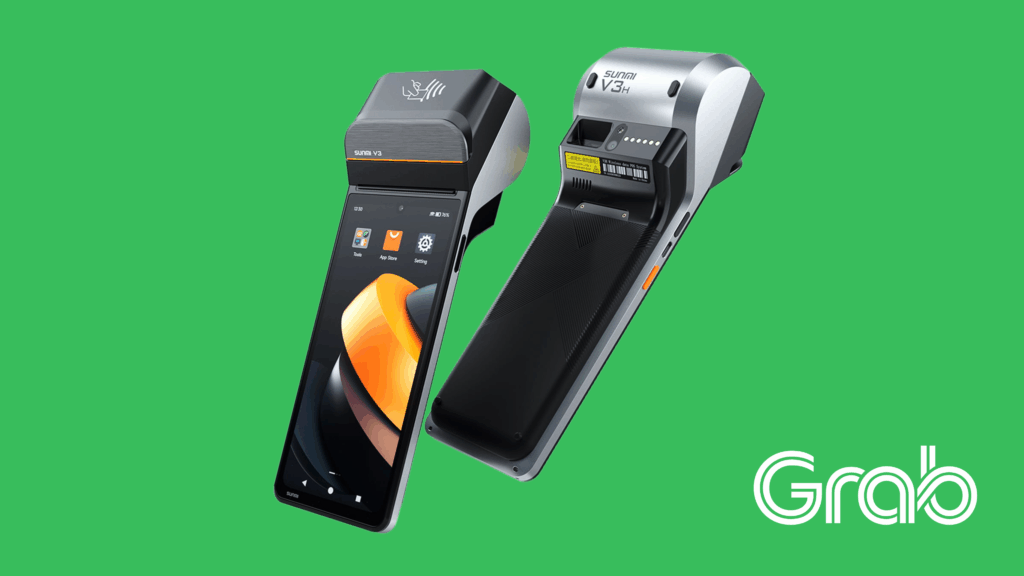
The most compatible and future-ready device is the Sunmi V3 — fully supporting the latest GrabMerchant App requirements:
Runs on Android 13
Equipped with 3GB RAM + 32GB Storage
Fast and stable performance with Qualcomm hexa-core
Larger screen with 6.75″ HD+ screen and 720*1600 resolution
Built-in 58mm high-speed printer for receipts
- Removable 7.7V 3100mAh
- Additional features of NFC function for contactless payments and high-speed laser barcode scanning (0ptional)
With Sunmi V3, Grab merchants can enjoy smoother performance, faster loading, and better reliability — so your business keeps running without interruption.
Sunmi V3 and GrabFood Merchant Apps
Sunmi Technology, a leading manufacturer of Android smart POS terminals, has partnered with Grab to help merchant-partners grow their businesses. From the earliest models, Sunmi V1s and V2, V2s to the latest model Sunmi V3 these devices have evolved to meet the growing needs of businesses. From July onwards in 2025, Sunmi V3 has become the latest compatible model as Grabfood Merchant Device.
The Sunmi V3, as the Grabfood Merchant device, is an incredibly useful mobile point-of-sale (POS) device and store management tool. It comes equipped with a thermal receipt printer, making it highly convenient for food deliveries, restaurants, and retail stores. With the Sunmi V3, business owners can easily access the GrabFood Merchant app, a powerful platform designed to help business owners process their online food orders quickly and accurately.
In this guide, we will cover the following:
- Key Features Of GrabFood Merchant Apps
- How GrabFood Or GrabMart works?
- How To Install And Update The GrabFood Merchant App In Sunmi V3?
- How To Troubleshoot GrabMerchant App And Sunmi V3?
- Common FAQs About The Sunmi V3 Device

Key Features of the GrabFood Merchant App
The GrabFood Merchant app offers a range of functions to streamline business operations, which includes:
- Edit food menus
- Update item pricing
- Change item availability during peak hours
- Modify all types of Grab orders, including self-pickup, delivery, and scheduled orders
- Generate monthly reports, including weekly sales revenue, profits, and transaction charges
How Does GrabFood and GrabMart works?
Grab Merchant apps work in a very simple way:
- First of all, customers place orders on your GrabFood or GrabMart store.
- The order appears in your GrabFood or GrabMart apps with sound notifications.
- Upon receiving the order, the Sunmi V3 prints two order slips: one for the kitchen/outlets and one for the customer.
- The kitchen starts preparing the order while the cashier enters it into the POS system.
- A Grab driver arrives to collect and deliver the order to the customer.
This process helps business owners receive more orders and increase your sales revenue.

How to Update the GrabMerchant App in Sunmi V2s?
- Connect the Sunmi V3 device to a stable WiFi connection.
- Open the Google Play Store from the home screen.
- In the search bar, type “GrabMerchant”, then enter.
- Tap on the “GrabMerchant” app.
- Tap “Install” or “Update” as needed.
Note that regularly updating the GrabFood Merchant app ensures smooth transactions and access to the latest features.
Special Promotion for Grab Merchants
In conjunction with this Grab device change, you may now apply a special RM50 discount voucher, exclusively for Grab merchants.
Use voucher code:
🎟️ GRABMEX50
This offer is valid for Sunmi V3 purchases for GrabFood Merchant and GrabMart Merchant only.

Why Buy from Mipos?
Mipos is proud to be the only official Sunmi showroom in Malaysia, offering the most complete range of Sunmi products under one roof.
Our team has received official technical training from Sunmi headquarters in Shanghai, covering hardware specifications, software setup, and troubleshooting — to ensure you can always get professional and reliable support every step of the way.
As an added benefit, Mipos provides an extra 1-month extended warranty for the Sunmi V3, giving you a total of 13 months warranty, where other retailers only provide 12 months warranty for the device Sunmi V3.

How To Troubleshoot GrabMerchant App and Sunmi V3?
Basic Steps:
- Restart the Sunmi V3 device by holding the power button for 15 seconds.
- Ensure the device’s battery is fully charged.
- Check the internet connection and try reconnecting to WiFi.
- Check for pending GrabMerchant app updates.
If issues persist, contact the Grab Help Center.
What if the Sunmi V3 Device Won’t Turn On?
- Check the battery level and charge the device.
Try a different power socket or charger. - Ensure the charging port is clean and unobstructed.
If issues persist, contact Mipos customer support.
What If the Sunmi V3 Device Won’t Print Receipts?
- Check the battery level and charge the device.
- Ensure the thermal receipt paper roll is not empty or jammed.
- Check that the paper roll is inserted correctly (paper feeding under, not over).
If issues persist, contact Mipos customer support. Note that thermal printheads may wear out over time, especially with heavy use, therefore it is normal to change printhead from time to time.
- Connect the Sunmi V3 device to a stable WiFi connection.
- Open the Google Play Store from the home screen.
- In the search bar, type “GrabMerchant”, then enter.
- Tap on the “GrabMerchant” app.
- Tap “Install” or “Update” as needed.
Note that regularly updating the GrabFood Merchant app ensures smooth transactions and access to the latest features.

Common FAQs about the Sunmi V3 Device
Q: Does Sunmi V3, the GrabFood Merchant device runs on WiFi only? Can I use a SIM card instead?
A: Sunmi V3, the GrabFood Merchant device can use mobile internet connections like a smartphone. If your outlet do not have WiFi, you can use a SIM card from your telecom provider.
Q: Can I install other apps besides from the GrabFood Merchant app?
A: Yes, you can install other apps, but it is recommended to avoid unnecessary ones to prevent slower performance and potential crashes.
Q: What is the warranty policy for the Sunmi V3?
A: Sunmi V3, as the GrabFood Merchant device comes with a one-year warranty covering manufacturer defects. However, Mipos ShopTech, as the official showroom of Sunmi in Malaysia, is providing extended warranty of total 13 months warranty. Damage caused by human factors, such as water spillage or a cracked screen, is not covered. The printhead is also not covered under warranty due to wear and tear.
Q: How soon can I get the device and start using GrabFood Merchant?
A: Located in Kuala Lumpur, we have ready stock of the Sunmi V3. You can pick it up in-store or have it couriered to your address within 1-3 working days. Once received, you can install the GrabFood Merchant app and start using it immediately.
Q: What accessories come with the Sunmi V3 device?
A: The Sunmi V3 comes with a power charger, a Type-C USB cable, and a user manual.
Q: What if I didn’t receive my order or the device is faulty upon receipt?
A: Contact our customer support for assistance with any issues regarding your order or device.

Where to Get Your New Device
You can purchase directly from Mipos ShopTech, the official Sunmi showroom in Malaysia, with ready stock and local support.
We provide:
Ready stock for immediate delivery including self -pickup and lalamove delivery
- Physical Sunmi showroom located at Kuala Lumpur for physical product demo
Fast setup and training
Local warranty and after-sales support
Don’t Wait Until It’s Too Late
If you continue using an older device after 1 December 2025, your GrabMerchant App may stop working — causing potential order delays or interruptions.
Avoid downtime and upgrade early to Sunmi V3 for a smooth transition.